This integration is powered by Singer's Freshdesk tap. For support, visit the GitHub repo or join the Singer Slack.
Freshdesk integration summary
Stitch’s Freshdesk integration replicates data using the Freshdesk REST API v2. Refer to the Schema section for a list of objects available for replication.
Freshdesk feature snapshot
A high-level look at Stitch's Freshdesk (v2) integration, including release status, useful links, and the features supported in Stitch.
| STITCH | |||
| Release status |
Released on February 12, 2026 |
Supported by | |
| Stitch plan |
Standard |
API availability |
Available |
| Singer GitHub repository | |||
| REPLICATION SETTINGS | |||
| Anchor Scheduling |
Supported |
Advanced Scheduling |
Supported |
| Table-level reset |
Unsupported |
Configurable Replication Methods |
Unsupported |
| DATA SELECTION | |||
| Table selection |
Supported |
Column selection |
Supported |
| Select all |
Supported |
||
| TRANSPARENCY | |||
| Extraction Logs |
Supported |
Loading Reports |
Supported |
Connecting Freshdesk
Freshdesk setup requirements
To set up Freshdesk in Stitch, you need:
-
Administrator permissions in Freshdesk. As Stitch will only be able to replicate data that the authorizing user has access to, we recommend that someone with these permissions complete the setup. For example: if the authorizing user only has access to a handful of tickets, Stitch will only be able to access and replicate the data for those tickets.
Having a Freshdesk administrator create the integration will ensure that Stitch is able to replicate all the data in your Freshdesk account.
Step 1: Retrieve your Freshdesk API Key
- Sign into your Freshdesk account.
- Click the user menu (your icon) > Profile Settings.
- Your API Key will display under the Change Password section of your profile page. Copy this key.
Leave this page open for now - you’ll need it to wrap things up in Stitch.
Step 2: Add Freshdesk as a Stitch data source
- Sign into your Stitch account.
-
On the Stitch Dashboard page, click the Add Integration button.
-
Click the Freshdesk icon.
-
Enter a name for the integration. This is the name that will display on the Stitch Dashboard for the integration; it’ll also be used to create the schema in your destination.
For example, the name “Stitch Freshdesk” would create a schema called
stitch_freshdeskin the destination. Note: Schema names cannot be changed after you save the integration.
Step 3: Define the historical replication start date
The Sync Historical Data setting defines the starting date for your Freshdesk integration. This means that data equal to or newer than this date will be replicated to your data warehouse.
Change this setting if you want to replicate data beyond Freshdesk’s default setting of 1 year. For a detailed look at historical replication jobs, check out the Syncing Historical SaaS Data guide.
Step 4: Create a replication schedule
In the Replication Frequency section, you’ll create the integration’s replication schedule. An integration’s replication schedule determines how often Stitch runs a replication job, and the time that job begins.
Freshdesk integrations support the following replication scheduling methods:
-
Advanced Scheduling using Cron (Advanced or Premium plans only)
To keep your row usage low, consider setting the integration to replicate less frequently. See the Understanding and Reducing Your Row Usage guide for tips on reducing your usage.
Step 5: Set objects to replicate
The last step is to select the tables and columns you want to replicate. Learn about the available tables for this integration.
Note: If a replication job is currently in progress, new selections won’t be used until the next job starts.
For Freshdesk integrations, you can select:
-
Individual tables and columns
-
All tables and columns
Click the tabs to view instructions for each selection method.
- In the integration’s Tables to Replicate tab, locate a table you want to replicate.
-
To track a table, click the checkbox next to the table’s name. A blue checkmark means the table is set to replicate.
-
To track a column, click the checkbox next to the column’s name. A blue checkmark means the column is set to replicate.
- Repeat this process for all the tables and columns you want to replicate.
- When finished, click the Finalize Your Selections button at the bottom of the screen to save your selections.
- Click into the integration from the Stitch Dashboard page.
-
Click the Tables to Replicate tab.
- In the list of tables, click the box next to the Table Names column.
-
In the menu that displays, click Track all Tables and Fields:
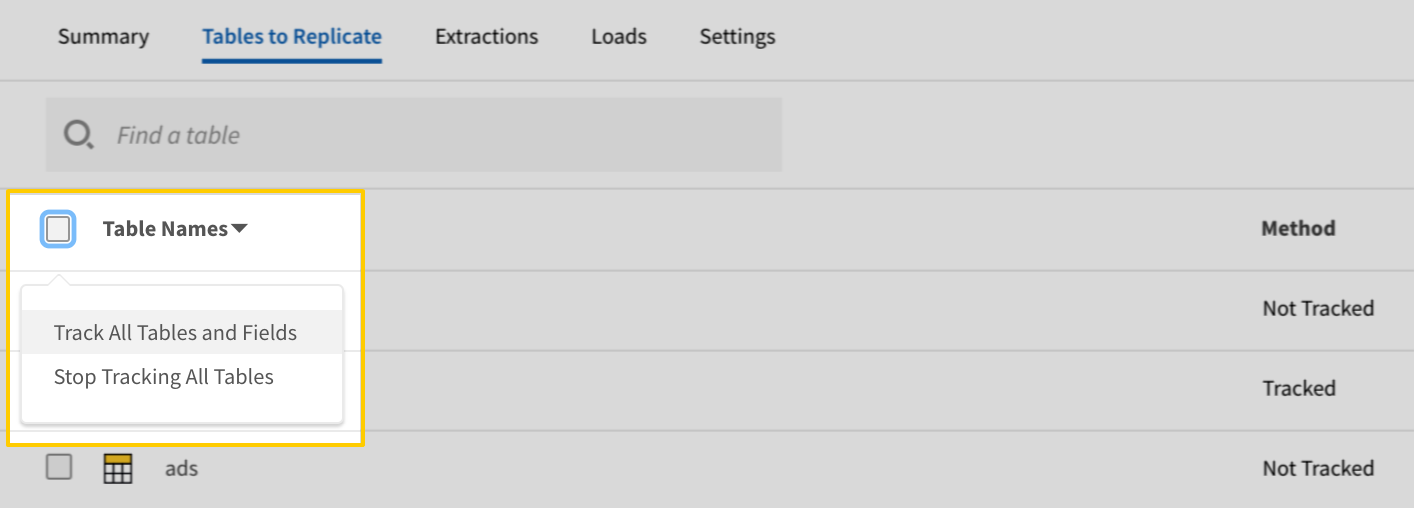
- Click the Finalize Your Selections button at the bottom of the page to save your data selections.
Initial and historical replication jobs
After you finish setting up Freshdesk, its Sync Status may show as Pending on either the Stitch Dashboard or in the Integration Details page.
For a new integration, a Pending status indicates that Stitch is in the process of scheduling the initial replication job for the integration. This may take some time to complete.
Initial replication jobs with Anchor Scheduling
If using Anchor Scheduling, an initial replication job may not kick off immediately. This depends on the selected Replication Frequency and Anchor Time. Refer to the Anchor Scheduling documentation for more information.
Free historical data loads
The first seven days of replication, beginning when data is first replicated, are free. Rows replicated from the new integration during this time won’t count towards your quota. Stitch offers this as a way of testing new integrations, measuring usage, and ensuring historical data volumes don’t quickly consume your quota.
Freshdesk table reference
Schemas and versioning
Schemas and naming conventions can change from version to version, so we recommend verifying your integration’s version before continuing.
The schema and info displayed below is for version 2 of this integration.
This is the latest version of the Freshdesk integration.
Table and column names in your destination
Depending on your destination, table and column names may not appear as they are outlined below.
For example: Object names are lowercased in Redshift (CusTomERs > customers), while case is maintained in PostgreSQL destinations (CusTomERs > CusTomERs). Refer to the Loading Guide for your destination for more info.
agents
The agents table contains info about the agents in your Freshdesk account.
|
Full Table |
|
|
Primary Key |
id |
| Useful links |

| Join agents with | on |
|---|---|
| groups |
agents.id = groups.agent_ids agents.group_ids = groups.id |
| satisfaction_ratings |
agents.id = satisfaction_ratings.agent_id agents.group_ids = satisfaction_ratings.group_id |
| tickets |
agents.id = tickets.responder_id agents.group_ids = tickets.group_id |
| time_entries |
agents.id = time_entries.agent_id |
| roles |
agents.role_ids = roles.id |
|
available BOOLEAN |
|||||||||||
|
available_since STRING |
|||||||||||
|
id
INTEGER |
|||||||||||
|
occasional BOOLEAN |
|||||||||||
|
signature STRING |
|||||||||||
|
ticket_scope INTEGER |
|||||||||||
|
group_ids ARRAY |
|||||||||||
|
role_ids ARRAY |
|||||||||||
|
created_at STRING |
|||||||||||
|
updated_at STRING |
|||||||||||
|
contact OBJECT
|
companies
The companies table contains info about the companies your various customers and contacts belong to.
Custom Fields
If applicable, Stitch will replicate custom fields related to companies in Freshdesk.
|
Key-based Incremental |
|
|
Primary Key |
id |
|
Replication Key |
updated_at |
| Useful links |

| Join companies with | on |
|---|---|
| tickets |
companies.id = tickets.company_id |
|
custom_fields ARRAY
|
||
|
description STRING |
||
|
domains ARRAY |
||
|
id
INTEGER |
||
|
name STRING |
||
|
note STRING |
||
|
created_at STRING |
||
|
updated_at
STRING |
contacts
The contacts table contains info about the customers or potential customers that have filed support tickets in any of the channels in your Freshdesk account.
Custom Fields
If applicable, Stitch will replicate custom fields related to contacts in Freshdesk.
|
Key-based Incremental |
|
|
Primary Key |
id |
|
Replication Key |
updated_at |
| Useful links |
|
custom_fields ARRAY
|
||
|
other_companies ARRAY |
||
|
view_all_tickets BOOLEAN |
||
|
id
INTEGER |
||
|
other_emails ARRAY |
||
|
company_id NUMBER |
||
|
STRING |
||
|
job_title STRING |
||
|
description STRING |
||
|
tags ARRAY |
||
|
deleted BOOLEAN |
||
|
updated_at
STRING |
||
|
phone STRING |
||
|
address STRING |
||
|
active BOOLEAN |
||
|
name STRING |
||
|
language STRING |
||
|
mobile STRING |
||
|
created_at STRING |
||
|
twitter_id STRING |
||
|
time_zone STRING |
||
|
avatar OBJECT |
conversations
The conversations table contains info about replies and public/private notes added to the tickets in your Freshdesk account.
|
Key-based Incremental |
|
|
Primary Key |
id |
|
Replication Key |
updated_at |
| Useful links |
| Join conversations with | on |
|---|---|
| tickets |
conversations.ticket_id = tickets.id |
| satisfaction_ratings |
conversations.ticket_id = satisfaction_ratings.ticket_id |
|
body_text STRING |
|
id
INTEGER |
|
incoming BOOLEAN |
|
private BOOLEAN |
|
user_id INTEGER |
|
support_email STRING |
|
source INTEGER |
|
ticket_id INTEGER |
|
to_emails
ARRAY |
|
from_email STRING |
|
cc_emails
ARRAY |
|
bcc_emails
ARRAY |
|
created_at
STRING |
|
updated_at
STRING |
groups
The groups table contains info about the groups your agents belong to.
|
Full Table |
|
|
Primary Key |
id |
| Useful links |
| Join groups with | on |
|---|---|
| agents |
groups.agent_ids = agents.id groups.id = agents.group_ids |
| satisfaction_ratings |
groups.agent_ids = satisfaction_ratings.agent_id groups.id = satisfaction_ratings.group_id |
| tickets |
groups.agent_ids = tickets.responder_id groups.id = tickets.group_id |
| time_entries |
groups.agent_ids = time_entries.agent_id |
|
agent_ids ARRAY |
|
auto_ticket_assign INTEGER, BOOLEAN |
|
business_hour_id INTEGER |
|
description STRING |
|
escalate_to INTEGER |
|
id
INTEGER |
|
name STRING |
|
unassigned_for STRING |
|
created_at STRING |
|
updated_at STRING |
roles
The roles table contains info about the various roles that can be assigned to team members in your Freshdesk account.
|
Full Table |
|
|
Primary Key |
id |
| Useful links |
| Join roles with | on |
|---|---|
| agents |
roles.id = agents.role_ids |
|
description STRING |
|
id
INTEGER |
|
name STRING |
|
default BOOLEAN |
|
created_at STRING |
|
updated_at STRING |
satisfaction_ratings
The satisfaction_ratings table contains info about customer satisfaction survey responses, or satisfaction ratings.
|
Key-based Incremental |
|
|
Primary Key |
id |
|
Replication Key |
updated_at |
| Useful links |
| Join satisfaction_ratings with | on |
|---|---|
| agents |
satisfaction_ratings.agent_id = agents.id satisfaction_ratings.group_id = agents.group_ids |
| groups |
satisfaction_ratings.agent_id = groups.agent_ids satisfaction_ratings.group_id = groups.id |
| tickets |
satisfaction_ratings.agent_id = tickets.responder_id satisfaction_ratings.group_id = tickets.group_id satisfaction_ratings.ticket_id = tickets.id |
| time_entries |
satisfaction_ratings.agent_id = time_entries.agent_id |
| conversations |
satisfaction_ratings.ticket_id = conversations.ticket_id |
|
survey_id INTEGER |
||
|
user_id INTEGER |
||
|
feedback STRING |
||
|
created_at STRING |
||
|
updated_at
STRING |
||
|
agent_id INTEGER |
||
|
group_id INTEGER |
||
|
id
INTEGER |
||
|
ticket_id INTEGER |
||
|
ratings ARRAY
|
tickets
The tickets table contains info about the tickets in your Freshdesk account.
Custom Fields
If applicable, Stitch will replicate custom fields related to tickets in Freshdesk.
|
Key-based Incremental |
|
|
Primary Key |
id |
|
Replication Key |
updated_at |
| Useful links |
| Join tickets with | on |
|---|---|
| agents |
tickets.responder_id = agents.id tickets.group_id = agents.group_ids |
| groups |
tickets.responder_id = groups.agent_ids tickets.group_id = groups.id |
| satisfaction_ratings |
tickets.responder_id = satisfaction_ratings.agent_id tickets.group_id = satisfaction_ratings.group_id tickets.id = satisfaction_ratings.ticket_id |
| time_entries |
tickets.responder_id = time_entries.agent_id |
| companies |
tickets.company_id = companies.id |
| conversations |
tickets.id = conversations.ticket_id |
|
custom_fields ARRAY
|
|||||
|
cc_emails ARRAY |
|||||
|
updated_at
STRING |
|||||
|
type STRING |
|||||
|
to_emails ARRAY |
|||||
|
id
INTEGER |
|||||
|
fwd_emails ARRAY |
|||||
|
source NUMBER |
|||||
|
due_by STRING |
|||||
|
company_id INTEGER |
|||||
|
responder_id INTEGER |
|||||
|
priority NUMBER |
|||||
|
deleted BOOLEAN |
|||||
|
facebook_id STRING |
|||||
|
subject STRING |
|||||
|
fr_due_by STRING |
|||||
|
STRING |
|||||
|
status NUMBER |
|||||
|
is_escalated BOOLEAN |
|||||
|
reply_cc_emails ARRAY |
|||||
|
description STRING |
|||||
|
tags ARRAY |
|||||
|
email_config_id INTEGER |
|||||
|
phone STRING |
|||||
|
description_text STRING |
|||||
|
requester_id INTEGER |
|||||
|
name STRING |
|||||
|
product_id INTEGER |
|||||
|
fr_escalated BOOLEAN |
|||||
|
created_at STRING |
|||||
|
spam BOOLEAN |
|||||
|
twitter_id STRING |
|||||
|
group_id INTEGER |
|||||
|
company OBJECT
|
|||||
|
requester OBJECT
|
|||||
|
stats OBJECT
|
time_entries
The time_entries table contains info about the time entries entered by agents working on tickets.
|
Key-based Incremental |
|
|
Primary Key |
id |
|
Replication Key |
updated_at |
| Useful links |
| Join time_entries with | on |
|---|---|
| agents |
time_entries.agent_id = agents.id |
| groups |
time_entries.agent_id = groups.agent_ids |
| satisfaction_ratings |
time_entries.agent_id = satisfaction_ratings.agent_id |
| tickets |
time_entries.agent_id = tickets.responder_id |
|
time_spent STRING |
|
start_time STRING |
|
created_at STRING |
|
executed_at STRING |
|
updated_at
STRING |
|
timer_running BOOLEAN |
|
note STRING |
|
ticket_id INTEGER |
|
billable BOOLEAN |
|
id
INTEGER |
|
agent_id INTEGER |
| Related | Troubleshooting |
Questions? Feedback?
Did this article help? If you have questions or feedback, feel free to submit a pull request with your suggestions, open an issue on GitHub, or reach out to us.